

Last month, I decided to build an app for the first time.
I didn’t do it to make money. I don’t expect it to make much, although it has earned about $150 so far. I built it because I wanted to understand AI better.
I’ve been experimenting with these tools since the first version of ChatGPT. Over the last four years, they have improved in ways that are honestly shocking to behold. Earlier this year, I wrote an article called “The Consequences of Avoiding AI”, describing some of the ways AI had already helped my business and saved me money. My larger point was simple: people should experiment with this technology and discover where it can create value in their own lives.
So I kept experimenting. And then things got a little out of hand.
The first app
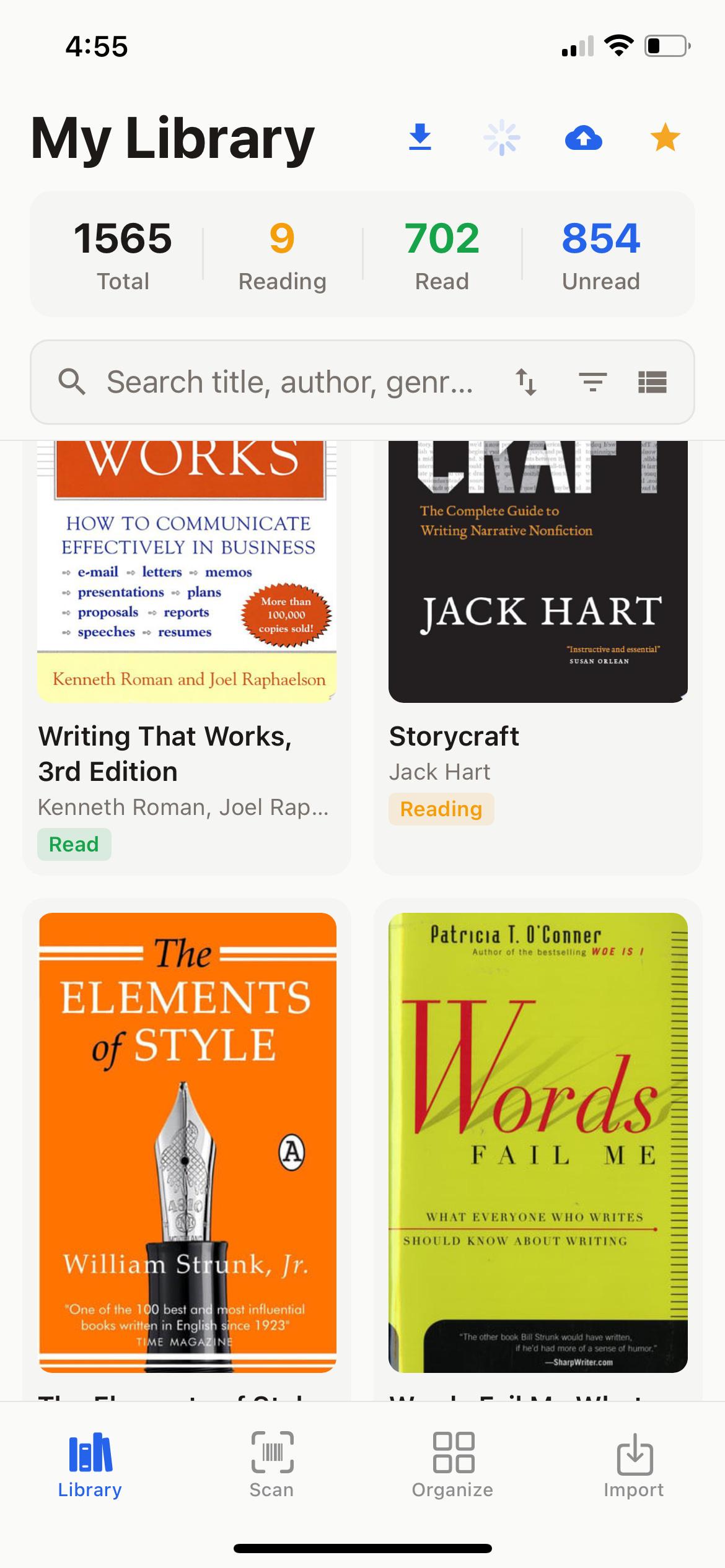
It started with a simple problem. I own a lot of physical and digital books. One day my daughter asked to borrow one, and I couldn’t remember whether I had it in Uruguay or somewhere else. I spent far too long looking for it.
That gave me the idea for Better Bookshelf: an app where I could scan the barcodes on my physical books, catalog them, and record where they were located. Then I added my Kindle and Audible libraries, along with my Readwise notes and highlights. It became one consolidated library for everything I own and read.
The app is now available at BetterBookshelf.co. (google Play, Apple)It is a modest little product, but it works. More important, I had actually shipped it
A couple of weeks later, we hosted a meetup at our farm in Uruguay. Several software developers were there—smart guys who spend their days writing code and building things. I asked whether any of them had shipped a product using the new AI tools. Several had made real progress, but nobody had released anything yet.
Building without shipping is common among entrepreneurs, especially technical ones. So I challenged them. With tools this powerful, I said, we should be shipping things all the time. In fact, I—a completely nontechnical person—ought to be able to produce three products a month.
It was mostly a rhetorical flourish. I had no list of three products, no schedule, and no real intention of proving the point.
Then I told my wife, Jane, about the conversation.
“So what three products are you going to build?” she asked.
That was the hard part.
When the constraints disappear
I’ve spent my life as an entrepreneur, and every business I’ve been involved with operated under serious constraints. You may have an idea and some useful skills, but most of the circle is made up of things you cannot do: money you don’t have, people you cannot hire, technology you cannot build, or time you cannot spare.
Those constraints are frustrating, but they also provide focus. If you cannot do everything, you have to ask what you can do. That pressure directs your creativity.
AI removes many of those constraints. Once you learn how to work with it, you can write software, design interfaces, research unfamiliar subjects, create websites, and solve technical problems that would previously have required an entire team.
That sounds liberating, and it is. But at first I found it strangely disorienting. When the old limitations disappeared, I was left facing the limitations of my own imagination. I had spent so long creating inside narrow boundaries that I had trouble seeing what to build when those boundaries were gone.
I decided to take the challenge seriously anyway.
Better Bookshelf had launched before August, so I didn’t count it. I started the month at zero. By the 11th, I had launched three products. A fourth had been submitted to Apple, and two more were well into development.
I used most of the major AI coding platforms, including Claude Code, OpenAI Codex, Kimi K3, and Manus. They all work differently, and on many projects I used more than one—sometimes to build together, sometimes to have one check the work of another.
I should emphasize that I have no technical ability. I have overseen complicated software projects and worked with excellent engineers and project managers, so I understand the process. But I had never built software myself.
Now I have. Along the way, I learned how a surprising amount of the machinery works—not with anything resembling expertise, but well enough to make useful products. That is the point. You no longer need to master every technical detail before you can build something.
It was still an enormous amount of work. By the end, Jane said I looked like a software developer, roaming around all day in sweatpants and a hoodie. I once described the whole exercise to her as a hobby, like building a chair we don’t need and nobody will ever sit in. The chair may be pointless, but learning to build it is not.
Here are the products I built and the problems I was trying to solve.
Podcast Prep
I record a podcast with Doug Casey twice a week. It revolves around current events, which means I have to keep up with the news. Frankly, it’s a pain in the ass. Even when I read something useful, I often forget it before Doug and I record.
PodcastPrep.co solves that problem. A browser extension lets me save articles and posts as I encounter them. The complete content is archived and placed in a queue for the next episode.
Just before we record, I click a button. AI organizes everything by subject and chronology, summarizes what happened, extracts useful quotations, and suggests discussion points. I begin each podcast with a couple of pages covering the most interesting things I’ve seen since Doug and I last spoke.
It does not replace my judgment. It makes sure my judgment has something better to work with.
HomeTend
We run a regenerative cattle ranch in Uruguay. Between the buildings, equipment, and infrastructure, something always needs attention. Thankfully, Jane manages most of it, which leaves me free to study markets and apparently build unnecessary software.
I noticed that her process often began with a photograph. She would see something that needed repair, take a picture, and later add it to a to-do list.
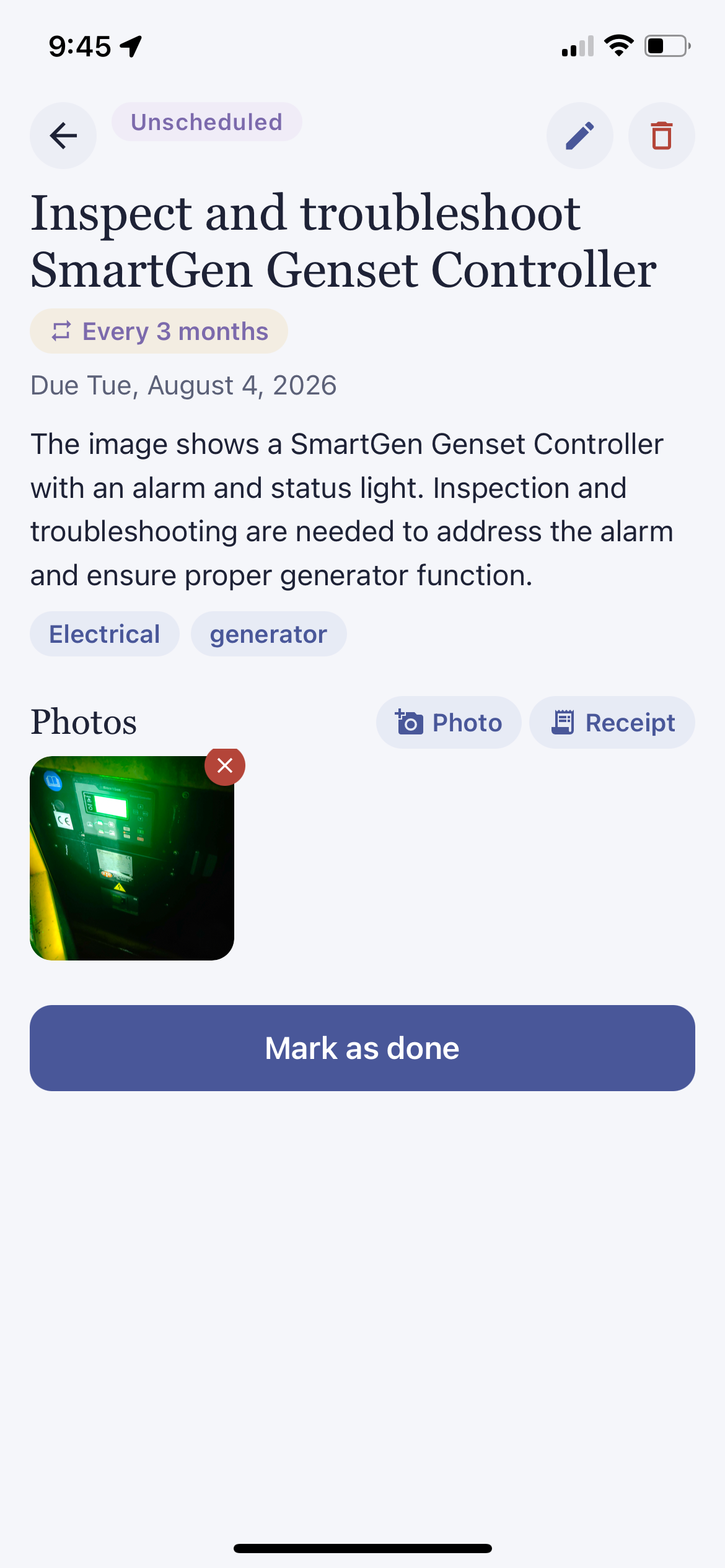
HomeTend.co (google Play, Apple) turns that habit into a photo-first project manager for the home or farm. Take a picture, and AI identifies the object and helps create the task. The mobile apps and website keep everything synchronized.
One night our local power went out after several cloudy days had drained the solar system. I went outside to start the generator. It sounded wrong, and a warning light was flashing. In the dark, I photographed it with HomeTend. The app identified the generator and recognized that the light indicated a service issue. It couldn’t diagnose the exact mechanical problem, but it did what I needed: captured the issue and turned it into a clear maintenance task.
Beyond the camera trick, it does the quieter work of keeping a property’s history in one place. Snap a receipt and it extracts the cost, the vendor, and the warranty date, so a year later you know exactly what you paid the electrician and whether that pump is still covered. Recurring chores — filters, gutters, generator service — reschedule themselves after you complete them, and the app nudges you when something is coming due without a booking.
There’s a contact book for tradespeople (importable from your phone), so the task for the leaking roof and the number of the man who fixed it last time live side by side. A calendar shows what’s ahead, reports show what the place is actually costing you, and finished tasks can be archived rather than deleted — the memory stays. Jane and I share one property; the app supports households, so everyone sees the same list and nobody repairs the same gate twice.
It’s free to use — the paid tier mostly buys unlimited AI scans and storage for the photo-happy. iPhone, Android, or hometend.co in a browser; everything stays in sync.
What Happened This Day
WHT.day grew out of Podcast Prep, but it addresses a broader problem. The news now moves so quickly that a major event from three days ago can disappear from memory. We vaguely remember that 2020 was insane. We are much worse at remembering the exact events, statements, and posts that made it feel that way.
What Happened This Day creates a permanent personal archive of the news. When I encounter an article or post worth remembering, I save it through the browser extension. The original content is preserved, even if it is later changed or removed online.
At the end of the day, AI turns everything I saved into a personal newspaper front page. After a year, I’ll be able to open the app and see what caught my attention on that exact date a year earlier—not a retrospective written with the benefit of hindsight, but the news as it appeared at the time.
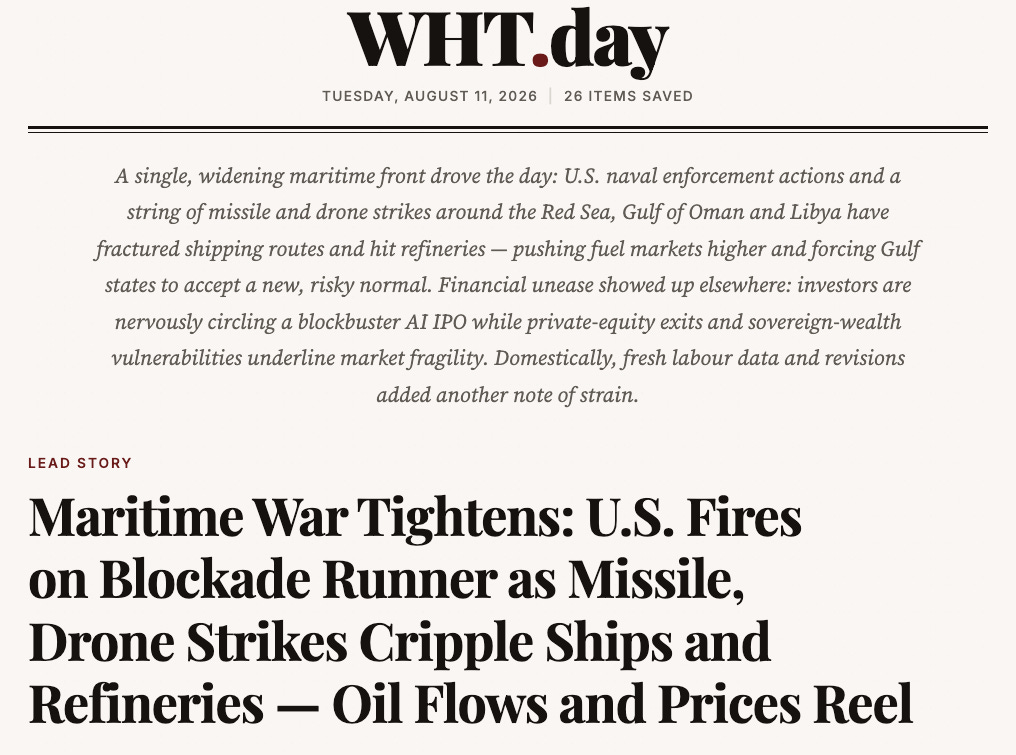
For a news junkie like me, that is something I’ve wanted for years. Now I have it.
ScreenStash
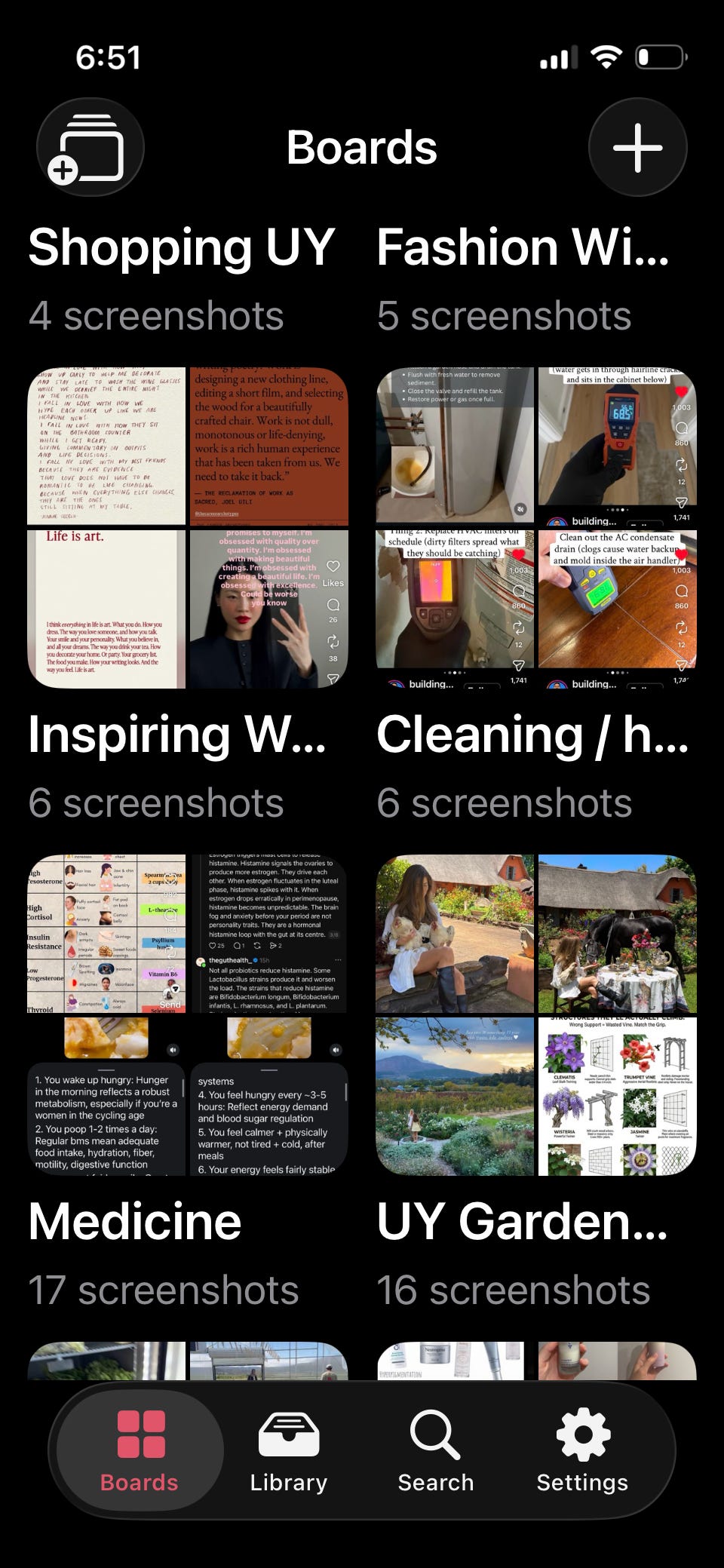
ScreenStash (google play & Apple App Store) came from watching Jane take screenshots. Instagram, Pinterest, news sites—whenever she sees something worth keeping, she takes a picture. She has accumulated more than 6,000 of them.
Then I checked my own phone and discovered that I had more than 2,700.
ScreenStash gets screenshots out of the general photo library and puts them somewhere useful. It works a little like Pinterest, but only for screenshots: they are backed up, organized, searchable, and easy to share.
While testing it, Jane realized that many of her screenshots were things she might want for her birthday or Christmas. People ask what she wants, and she can never remember. Now she has a collection she can actually find and share.
Podcast Prep, HomeTend.co, and ScreenStash.co are the three products I counted toward my challenge. What Happened This Day grew out of the same burst of building.
DoneBox
The next two products are still in development. I don’t know whether either will become a commercial product, but I already use both.
DoneBox began with my dislike of to-do lists. The only satisfying part of a to-do list is crossing something off. When I’m doing my best work, I tend to move from one thing to another in a flow state. At the end of the day, I may have accomplished a lot but struggle to explain exactly what I did.
Years ago, a service called iDoneThis would email a simple question: What did you get done? You replied, and it organized the answers into a calendar. DoneBox updates that idea.
Instead of confronting you with everything you have failed to do, DoneBox records what you have done. You can add a link to an article you published, a screenshot of a sale, notes from a meeting, or a line saying that you spent 45 minutes reading a book. AI categorizes the entry, connects it to the right project, and adds it to a permanent daily record.
It can also pull completed activity from tools you already use: meetings from Google Calendar, revenue from Stripe, health data from wearable devices, listening history from Spotify, and book highlights from Readwise. A task manager is included, but completed tasks flow into the same diary of accomplishments.
The result is a record of the progress that ordinary task managers ignore. You can see what projects moved forward this week, how this month compares with last month, and what patterns are emerging in your work and health.
Most people are more productive than they realize. They simply lack a good way to see it.
NoteStream
[mac desktop, windows desktop, Android phone] I’ve used note-taking software for years. Evernote contains much of my life going back to about 2010: meeting notes, travel plans, receipts, tax information, and countless other things. But I became uncomfortable with its security and pricing. I moved to Standard Notes for its encryption, but never enjoyed using it.
So I began building my own. NoteStream is by far the most complicated product I have attempted.
The idea is a private, local-first notes app built around one continuous stream. Open it and start writing. There are no folders to choose and no save button. Each entry is automatically dated, and previous days remain a scroll away.
Usefully, it can import from Evernote, Apple Notes, and Standard Notes
Most note-taking apps store information but leave you responsible for remembering where you put it. NoteStream searches across the entire history and suggests older notes that may connect to what you are writing now. You decide whether the relationship is real. Over time, isolated thoughts can become chains of related ideas spanning months or years.
The primary library stays on your own device. Encrypted backups and synchronization can run through your own Google Drive, so the company providing the software never needs readable access to your notes. Existing material can be imported from apps such as Evernote, Apple Notes, Standard Notes, and Notion.
Will anyone besides me want it? I don’t know. But that uncertainty is part of the exercise. I have to ship it before the market can answer.
UPDATE: I’ve published it for free at Notestream.co. I’m still making improvements as I use it. I have thousands of notes from Evernote, Apple Notes, and Standard Notes which Notestream imported. I love the idea of having all of it out of those systems and in a single and secure notetaking app that’s well organized, easily searched, and a pleasure to use.
That’s six published products in less than three weeks. It’s been quite the learning experience.
What I learned
I built these products for myself. I cannot know what the world wants, but I know the recurring annoyances in my own life. I know when I cannot find a book, forget a useful headline, lose a screenshot, overlook a maintenance problem, or finish a productive day without any clear record of what I accomplished.
That is a good place to begin. Find a problem you understand because you actually have it, then build the tool you wish existed.
I’m not sharing all this to promote the apps, although I would be delighted if people used them and sent me feedback. I’m sharing it because a month ago I had no technical skills and one little bookshelf app. A few weeks later, I had shipped several products and built working versions of several more.
The lesson is not that software is now effortless. It isn’t. These projects consumed a ridiculous amount of time and caused plenty of frustration. AI also makes mistakes, gets confused, and occasionally breaks something that worked perfectly five minutes earlier.
But the barrier has moved. The question used to be: Can I afford the people and technology required to build this? Increasingly, the question is simply: What should I build?
For an entrepreneur, that is an extraordinary change. The scarce resource is becoming less technical and more human: curiosity, taste, persistence, and the imagination to see what might be useful.
The tools will keep improving. The more interesting question is whether our creativity can keep up.
Matt - I can just see Jane not missing a beat and saying “so, what three apps are you going to do?” And you immediately thinking “Damn, I did it again!” 😂😂
Great start for my day!!
Matt: Well presented and inspirational. Great examples of using AI tools to forge practical solutions to everyday nook and cranny problems. And thanks for spurring us on.